3 actionable task management tools selected by experts in to-do list management + α [2020 definitive edition]
Published on 1/10/2026
There are various options for to-do lists, from analog tools such as memo pads and calendars to online tools.If you can use the tools that suit you, it will become an easy and powerful tool to get you closer to achieving your goals.
The to-do list you share with your task management partner is flexible and compatible with a wide range of to-do list management tools that you currently use, but in this article we will introduce some of the most recommended tools.
Conditions for a to-do list management tool that allows you to continue taking action
Preface: Any tool that you think suits you is OK!
First of all, if you are not dissatisfied with the to-do list management tool you are currently using and are able to use the necessary functions (any toolNo need to try to use every feature), there is basically no need to switch.It can be said that no matter how highly functional a tool is, there is nothing better than something that feels comfortable in your hands.
However, if you’re not getting much progress in your work or studies with the tools you’re currently using, and you’re wondering if there’s a better tool out there, that could be a good reason to try out a new tool.Please feel free to use the tools introduced in this article.
When choosing a new one, we recommend one that has a sharing function.
There is no denying that this is a position talk for a task management partner’s blog post, but I believe that a sharing element is essential for a to-do list management tool that allows you to continue working with high productivity.
The sharing function not only allows you to collaborate with others, but also motivates you to tackle tasks.
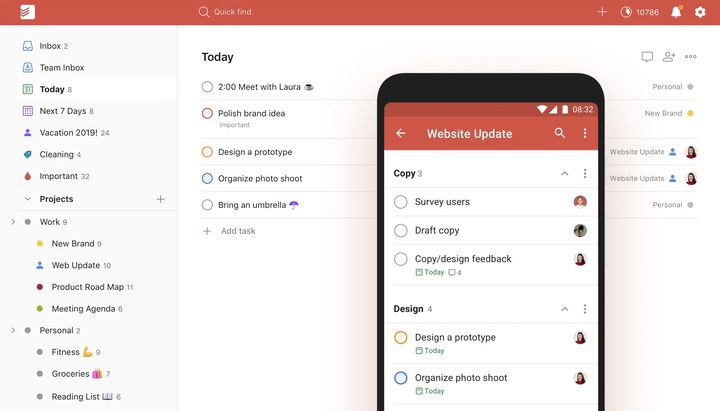
This is our most recommended task management partner.If you are wondering which to-do list management tool to use, you should definitely start with this one.
It has all the main functions necessary for to-do list management in a well-balanced manner, and when using it with a task management partner’s service, you can also share only specific projects.It also has extensive integration with external services such as Google Calendar.
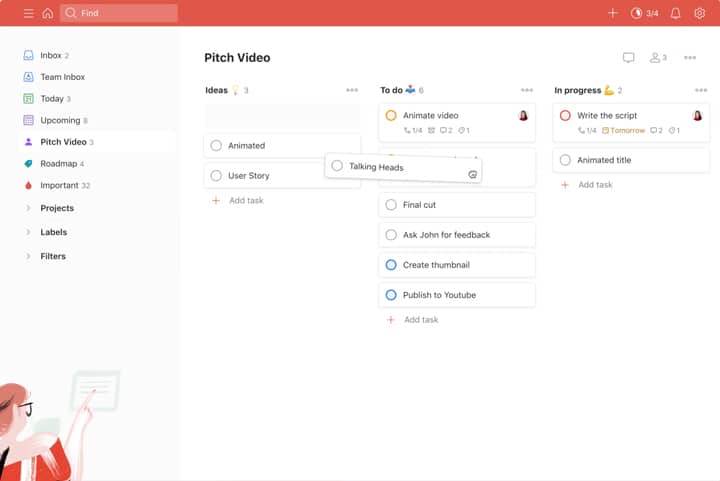
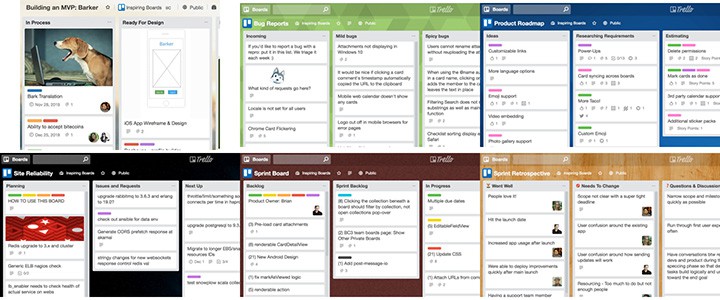
TrelloCard-type task management, such as , is now supported in a recent update.(“kanban board)
By being able to switch between normal list view and card view for large projects divided into sections, it can be said that it can now support a wider range of to-do management requirements than before.
On the official websiteExplanation and distribution of project templatesIt also contains useful information not only when using it for the first time, but also when you want to expand its usage.This content is recommended for those who are interested in card-type ToDo management but want to know specifically how to use it.
The free version is convenient enough, but if you subscribe to the paid plan, you can use it even more conveniently with labeling and commenting features.One of the attractions is that the price is 338 yen/month (annual payment).
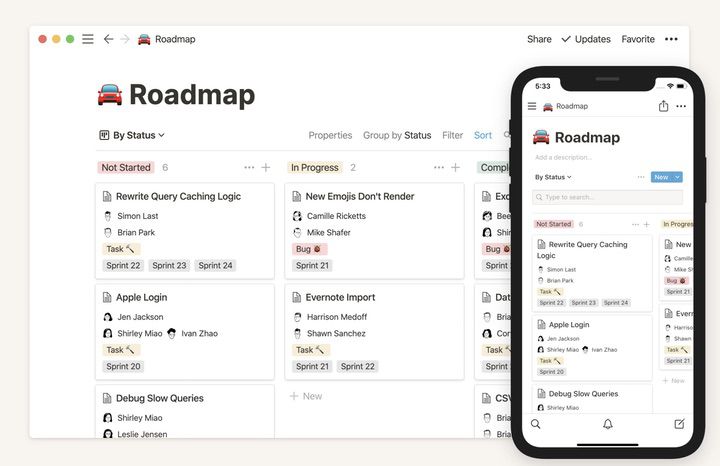
Notion [Recommendation level: ★★★★☆] [Definitive online note tool, powerful ToDo management and infinite customization]
Although the service is currently only available in English, it is a comprehensive note-taking tool that has gained attention in recent years and can be used not only for to-do lists but also for creating and organizing various documents.TrelloCard-type task management is also possible.It is a powerful tool that allows you to manage files in your own free format.
It is not only a to-do list management tool, but also a useful tool for greedy people who want to manage all the materials and notes they need for work or study.
If you subscribe to a paid plan, you can upload unlimited files and use features that allow multiple people to collaborate.
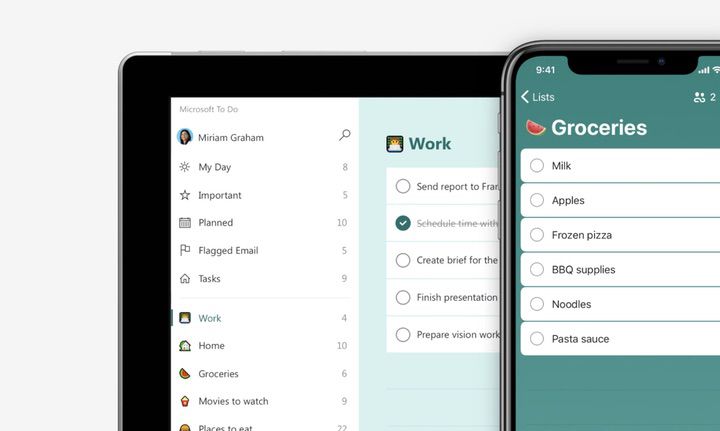
This is an excellent to-do list management tool.Although it is made by Microsoft, it is also available for iPhone and Android.
Huge companies such as Google and Apple offer to-do list management tools, but these systems prioritize ease of understanding and simplicity over functionality, and do not meet the requirements of this article.
However, Microsoft To Do is Microsoft’s take on Wunderlist, a to-do list management tool that has a proven track record and is popular.Although it is a tool provided by a huge company, it is as versatile and easy to use as Todoist. Especially if you use Office 365 on a regular basis, it is definitely your first choice.
An excellent tool that has established its own unique personality despite being a runner-up.
What we introduce here is not a pure to-do list management tool, but it is a to-do list management tool that can be used conveniently depending on your ingenuity.
For those who want to explore how to use to-do lists in their own way without relying on a specific format, the above-mentioned Notion is recommended, but the following tools are also excellent.
It is a service that feels like managing task memos by pasting them on a whiteboard, and is recommended for those who want to progress while feeling the sense of progress.
Todoist and Notion can also be used in a board-style layout, but you can also paste images like an image board, so if you use it properly, you will be able to move forward with tasks while feeling the sensation of activating your brain.
Also, since there is a high degree of freedom in customizing the board design, it will be a great help when you want to share the worldview of each project with team members. It is no wonder that it is often used in creative fields such as design and game production.
Previously, when it came to card-type tools, Trello was thought of as a one-of-a-kind feature.RecentlyTodoistSimilar features have been added to competing services, but it still remains unrivaled in terms of visual richness and powerful team collaboration functions.
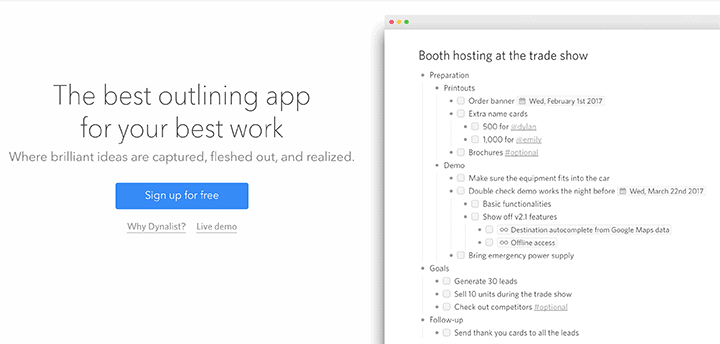
It is a writing tool called an “outliner”, and although its main function is not as a to-do list management tool, it is an excellent tool if you want to incorporate the flow of your thoughts into writing and organize them into tasks.Although it is currently only available in English, it is a popular service with a rapidly increasing number of fans in Japan.
It is a very pleasant tool that allows you to create and maintain tasks while thinking about your thoughts and the flow of things using the unique method of using an outliner, so it can be useful not only for creating tasks but also as a powerful thinking aid when thinking about things.
Dynalist is also introduced in the article below, so please refer to it if you want to know more.
Many people use the spreadsheet tools they use at work to manage their to-dos. Since it is a tool that is often used by each person in its own format, it requires some ingenuity and effort, such as creating rules, in order to share it with others and proceed with things, but it has great appeal as a tool with the highest extensibility.
If you wish to use the services of a task management partner, you will need to be provided with instructions on how to check progress, but these tools can also provide flexible support. For security reasons, we cannot accept checks sent as Excel files (.xls) attached to emails.Thank you for your understanding.
Analog to-do management using handwriting tools such as notebooks, calendars, whiteboards, sticky notes, etc. [Recommendation level: ★★★★☆]
In this article, we have mainly introduced online services, but even as technology advances, there are still advantages to handwriting management using analog tools.
The benefits vary greatly depending on each person’s situation, but if you start slowly trying to manage things with analog tools when digital tools are not working, things often start to go smoothly.
The tactile feel of writing with a pen on paper and the sense of accomplishment that comes from checking off a task or peeling off a sticky note are attractions that digital tools don’t have.Things like this can help motivate you to work on things, so if you feel stuck, we recommend switching to manual management, even if it’s only temporarily.
If you are using this service as a task management partner, you can share it by taking a photo of your handwritten paper with your smartphone and sending it as an attachment.
Task management tools are useful tools to help you get things done.When you use the service, you will share tasks using the tools that are most convenient for you. Of course, recommendedBasic support planWe’ll work with you to find the tools that are right for you.
Note: This article is translated from the Japanese version. The call plan (voice support) mentioned here is not yet available in the English version and is currently under preparation. Updates will be shared on the English site when the service is ready.
Author
Shinya Oishi
A freelance designer and developer involved in promotion and public relations for a wide range of companies, organizations, and facilities.
At Task Management Partner, responsible for business planning, website development, and illustration.
Known for versatility and a wide-ranging skill set—including design, illustration, development, and content creation—I am capable of and interested in many things, which often leads to handling an overwhelming number of tasks.
This service was created to address that challenge by having someone else review and help organize one’s tasks. As a service built on the principle of “selling what I myself truly need,” I confidently recommend it to anyone struggling with task management.
Need help with Task Management Partner?Contact us anytime
If you have questions about our services or plans, feel free to reach out via the inquiry form.